2019 Transfer Music from Mac to iPhone Using Cloud Services
Perfect for: iPhone users who have much iOS space and have stable Wi-Fi connection.
Cloud services allow you to store music on servers using the Internet, so you can technically use them to transfer music from Mac to iPhone as well. Here are some services you could try:
Google Play Music
Google Play Music allows you to buy music and store it on the cloud, so this means that you can share it among many devices. However, one major limitation is that you will need an Internet connection and download another app on iPhone to access your songs. Also, you usually have to buy the music.

Airmore
Airmore is a convenient app that lets you connect all of your devices together and transfer files between them wirelessly. Like any other cloud app, though, one huge limitation is that you need to have an Internet connection to use it - it is wireless, after all. Also, it requires a two-step process, since you need to upload the files to the cloud from your Mac, and then download them off the cloud to your iPhone.In contrast, with TunesMate, you can just directly transfer music from your Mac to your iPhone and you don’t need an Internet connection.

03 Transfer Music from Mac to iPhone with iTunes
Perfect for: iPhone users who do not fear to lose songs while transferring.
Of course, you can always just go with iTunes, since it’s the default option—even if it’s not the best one. Here is how to do it:
Launch iTunes and connect your iPhone to your computer.
On iTunes, make sure you are in "Music" library. Go to "File > Add File to Library" and locate your Mac music.
Select the songs you want to transfer and hit "Open" to add them to iTunes music library.
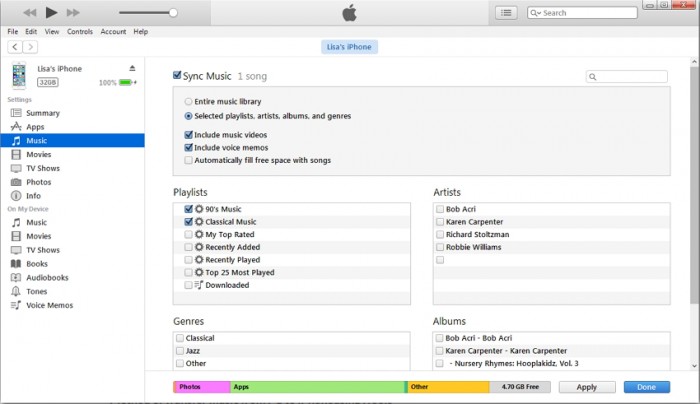
Click device icon at the upper right corner on iTunes and go to "Music" from the left sidebar.
Check "Sync Music" and choose to sync entire music library or selected songs. Hit "Sync" button to transfer music from iTunes library to iPhone.
As you might already imagine, there are a few limitations with this.
For one, it will erase the previous music on your iPhone.
It only supports specific formats, like MP3. You need to convert music first.
If your iPhone is synced with another iTunes library, or it is the first time to sync your iPhone music on this Mac, it will erase your iPhone.Sponsor ads:
Gihosoft Free iPhone Data Recovery:https://www.gihosoft.com/iphone-data-recovery-free.html
Gihosoft iPhone Data Recovery Free
Free iPhone Data Recovery Software for Windows/Mac
Recover up to 12+ types of files, including contacts, SMS, photos, WhatsApp, Viber, notes, etc.
Restore lost data from iOS devices directly or from iTunes and iCloud backup
Recover iPhone data lost due to iOS upgrade/jailbreak, accidental deletion, device lost or broken
Support all the latest iPhone, iPad and iPod Touch
Both Free and Pro version.
If you lost data after you updated to a new iPhone, you can always use Gihosoft iPhone Data Recovery to get the data back from the old iPhone or backup.You may also like: iphonerecovery.com
If you use android phones, please choose Gihosoft Android Data Recovery.
With Gihosoft Android Data Recovery, no longer afraid of data loss!
Must read:Youtube video downloader for pc
Gihosoft RePicvid Free Photo Recovery Software provides a free photo recovery software for windows to help users recover the deleted or lost photo for free.
Jihosoft Android Data Recovery: the best Android Data Recovery software for Windows and Mac to recover deleted contacts, messages, photos, videos, WhatsApp and etc from Android devices.Tips:How to transfer messages from iPhone to iPhone
jihosoft Free iPhone Data Recovery

Hiç yorum yok:
Yorum Gönder